
How to use Keystone | Builder Framework
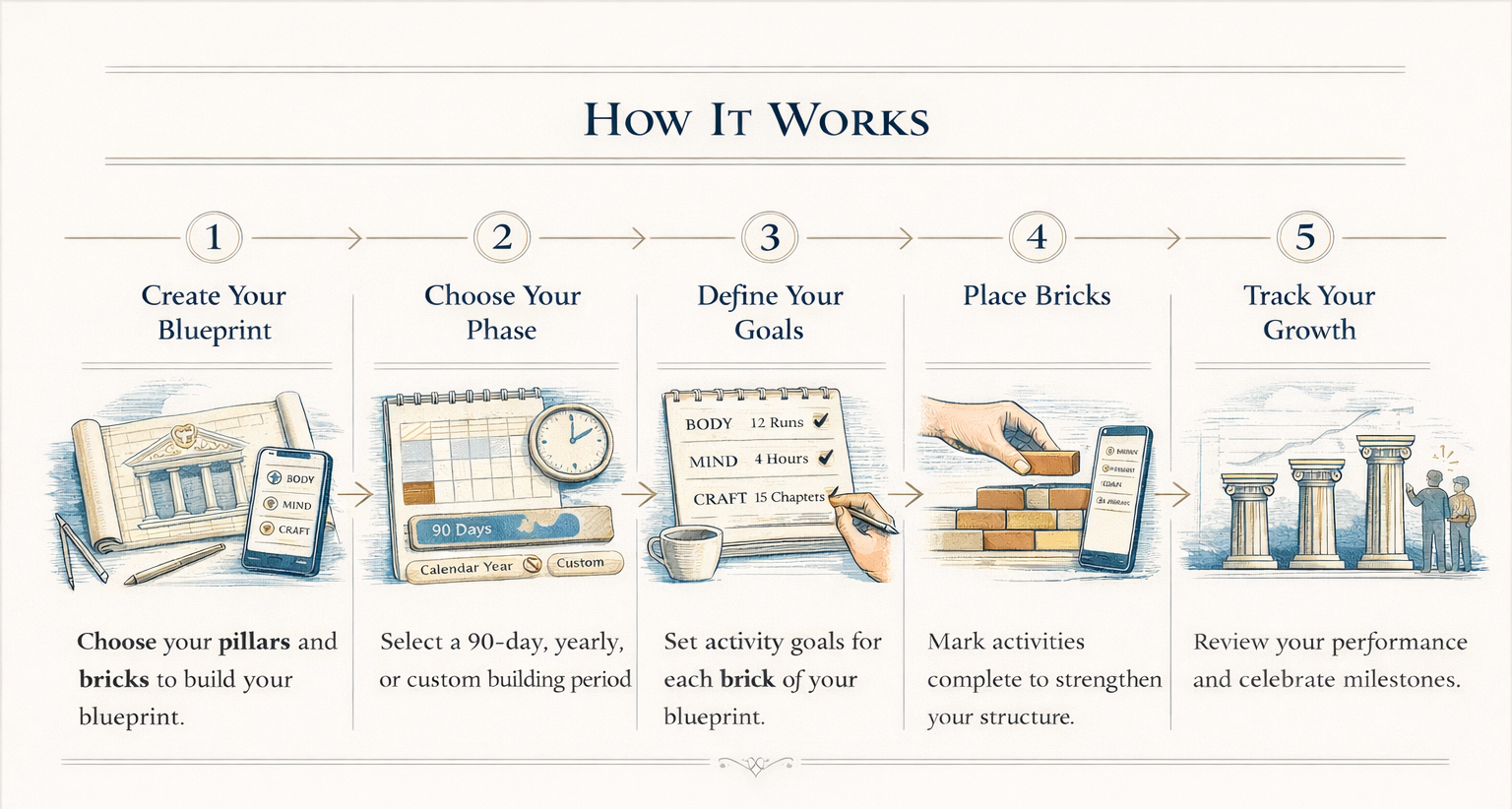
Step 1
Create Your Blueprint
Every structure begins with a blueprint.
In Keystone, your blueprint defines:
• the pillars of your life
• the activities (bricks) that strengthen those pillars
• the goals you want to achieve during a building phase
You can create your blueprint in two ways.
Build Your Blueprint Manually
If you already know the areas you want to focus on, you can design your blueprint directly.
The app allows you to define your own pillars and choose the activities that will strengthen them. There's no fixed formula — your pillars should fit your goal:
Body · Mind · Craft — a generalist
Technique · Fitness · Mental Game — a cricketer
Practice · Repertoire · Performance — a musician
For each pillar, you select bricks — the repeatable activities that support your growth. Examples include:
Running · Meditation · Reading · Writing · Skill practice
To make things easier, the app includes many pre-populated brick ideas that you can select and customize.
Use the AI Architect
If you're unsure where to start, Keystone includes an AI Architect.
Through a short interactive questionnaire, the AI helps you:
• clarify your goals
• suggest meaningful pillars
• recommend activity bricks
• design a balanced blueprint
• revise the blueprint conversationally — talk to the Architect again anytime before you finalize it, and it updates the plan rather than starting over
The AI Architect, in a minute.
Step 2
Choose Your Building Phase
Next, you choose the time period for your construction phase.
Keystone supports several options:
• 90-day building phase
• Calendar year
• Custom time period
This phase defines the period during which you will accumulate bricks and track progress toward your goals.
Many builders prefer the 90-day cycle, as it allows for focused progress while remaining flexible enough to adjust goals regularly.
Step 3
Define Your Activity Goals
Once your pillars and bricks are defined, you can set goals for each activity.
Keystone allows two ways to define your targets.
Method 1 — Session-Based Goals
You can specify:
• how long each session should be
• how many sessions you want per week
Example: Running — 30 minutes per session, 3 sessions per week
Keystone automatically calculates your total goal for the building phase.
Method 2 — Phase-Based Goals
Alternatively, you can start with a total goal for the entire phase.
Example: Read 12 books in 90 days
The app will then help you work backwards to determine:
• how frequently you need to place bricks
• what each session should look like
This flexible approach allows you to design goals that match your lifestyle.
Step 4
Place Bricks as You Make Progress
This is where the building begins.
Whenever you complete an activity, you simply place the corresponding brick in the app. For example:
Finished a run → place a running brick
Completed meditation → place a meditation brick
Wrote for an hour → place a writing brick
Each brick strengthens the pillar it belongs to.
Over time, you begin to see your pillars visually grow.
This simple act reinforces the most important idea behind Keystone:
Small actions accumulate into meaningful progress.
Laying the day's bricks.
Tip: put your temple on your home screen (Android)
The Keystone widget shows your temple and how many bricks you've laid today, so you see your progress every time you unlock your phone. Tap it to jump straight in.
The quickest way: open Settings in the app and tap Home-screen widget, then Add to home screen. Or add it yourself: press and hold an empty spot on your home screen → Widgets → Keystone → drag the Keystone Temple widget onto your first home screen page, so it greets you every time you unlock your phone.
Step 5
Review Progress
Keystone provides several ways to review your progress.
Pillar Growth
Watch how each pillar grows as you place more bricks. This visual feedback helps you see the structure you are building.
History View
The History View allows you to examine your journey over time. You can review:
• activity history
• consistency patterns
• performance across weeks and months
This helps you understand your habits and refine your blueprint.
Review Past Structures
When you finish a building phase, Keystone doesn't just archive it quietly. Completing a temple is marked with a small ceremony — a summary of how long you built, how many bricks you placed, how many pillars you raised — and it's saved permanently to your Hall of Records. Every phase you've ever finished stays there, browsable, as a permanent record of what you've actually built.
Build With Others
Growth becomes more meaningful when shared.
Once a week, Keystone gently prompts you to look back at what you built and share it — if you want to — with whoever you choose: a friend, a small group chat, anyone. There's no in-app network, no public feed, and no algorithm. Sharing uses your phone's own share sheet, with your own caption, sent wherever you like.
Dedicated Builder Circles — small trusted groups inside the app, with shared weekly reports — are coming soon.
Start Building
You don't need the perfect blueprint to begin. You only need the first brick.
Join the Beta